Gameplay / System Programmer
Eclipse Survivor
Unity rogue-lite survival shooter focused on manual combat, enemy waves, upgrades, and eclipse-driven progression.
Eclipse Survivor is a Unity third-person rogue-lite survival shooter where the player survives enemy waves until a total eclipse triggers the final boss. The project focuses on manual aiming, physics-based movement, XP upgrades, procedural spawning, and enemy wave pressure. My work centered on the core gameplay systems, including player control, enemy AI, progression, object pooling, and game flow.
Role: Gameplay Programmer - AI - Systems
Team Size: Solo
5 weeks
Unity (C#)
Overview
Eclipse Survivor is a Unity third-person rogue-lite survival shooter built around manual combat, enemy wave pressure, and eclipse-driven progression. The player controls a witch fighting to survive escalating enemy hordes for a limited time, collecting XP, choosing upgrades, and growing stronger until the total eclipse triggers the final boss encounter. The core loop revolves around moving, aiming, shooting, collecting experience, and adapting the build while enemy pressure increases over time.
As the solo developer, I designed and implemented the full gameplay structure through modular C# systems. My work covered the player controller and manual aiming, enemy AI and wave director, rogue-lite progression and upgrade system, object pooling with procedural spawn optimization, game flow, eclipse event, HUD feedback, audio, pickups, and runtime performance.
Player Controller & Manual Aiming
Built a manual third-person combat controller with camera-relative Rigidbody movement, decoupled aiming, smooth body rotation, and camera-based shooting. The system uses a two-ray firing setup with muzzle line-of-sight verification, preventing shots from passing through walls while keeping the aim responsive and readable.
Enemy AI & Wave Director
Built a steering-based enemy AI and wave director that creates constant horde pressure without using NavMesh. Enemies seek the player, separate from nearby enemies, and use orbit behavior to form readable crowds, while EnemyManager controls tiered spawning, difficulty scaling, enemy selection, and the timed boss encounter.
Rogue-lite Progression & Upgrade System
Implemented the complete run-based progression loop: enemies drop XP, the player levels up, chooses between weighted upgrade options, and gains stat boosts or new abilities. The system connects XP collection, pause-safe level-up choices, ScriptableObject upgrade data, ability unlocks, and HUD feedback into a clear rogue-lite power curve.
Object Pooling & Procedural Spawn Optimization
Built a pooled runtime spawning system for enemies and XP pickups, with safe reuse, procedural spawn validation, ground snapping, playable-area checks, and capped XP orb cleanup. The system reduces unnecessary Instantiate/Destroy overhead while keeping enemy waves stable, readable, and fair during high-pressure survival gameplay.
PLAYER CONTROLLER & MANUAL SHOOTING
Problem
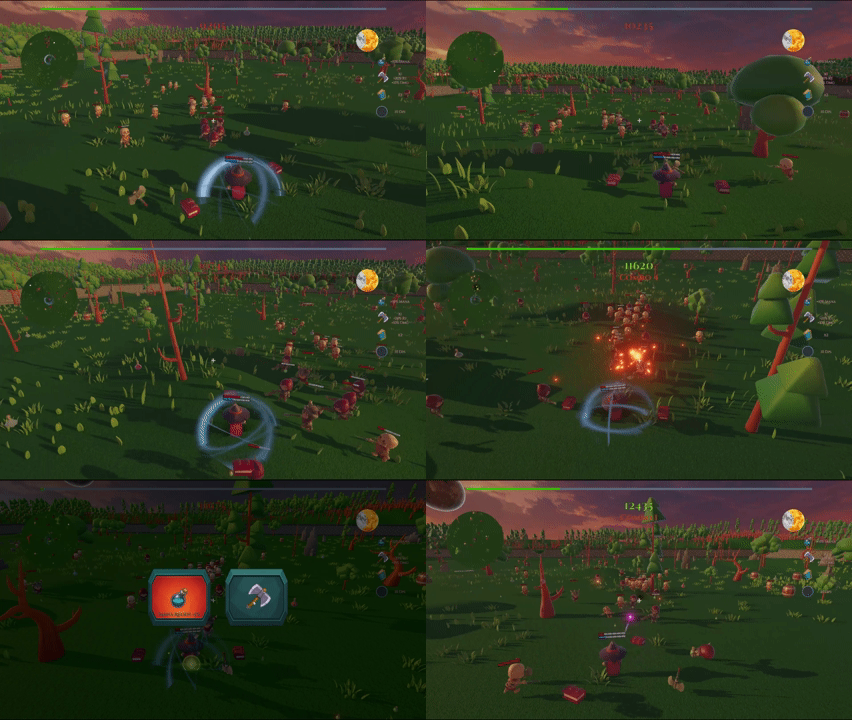
Eclipse Survivor needed a more active combat loop than a traditional auto-attacking survivor game. The player had to move, aim, rotate, and shoot manually while being surrounded by enemy waves. A standard rotate-toward-movement controller would not work well for this design, because the player needed to strafe, reposition, and keep aiming in a different direction at the same time.
The shooting system also needed to solve a common third-person camera problem: if the shot is fired only from the camera, the player can sometimes hit enemies through walls or around corners. This made the system feel unfair and visually disconnected from the wand muzzle.
Solution
I built a physics-based third-person controller where movement, aiming, and shooting are separated into focused components. Player movement is handled through Rigidbody velocity in FixedUpdate, while body rotation is controlled separately by an aiming component that follows the camera’s flat-forward direction. This allows the player to move in one direction while aiming and shooting in another.
For shooting, I implemented a camera-authoritative raycast system with muzzle line-of-sight verification. The camera ray determines what the player is aiming at, but a second ray from the muzzle checks whether the shot is physically blocked. If a wall or obstacle is in the way, the shot stops at the obstruction instead of passing through it. This keeps the combat responsive while making the result feel grounded and fair.
Snippet 1 - Camera-Relative Rigidbody Movement
private void FixedUpdate()
{
    if (isDead) return;

    float speed = EffectiveMoveSpeed;

    Transform cam = cameraTransform != null
        ? cameraTransform
        : (Camera.main != null ? Camera.main.transform : null);

    Vector3 forward = Vector3.forward;
    Vector3 right   = Vector3.right;

    if (cam != null)
    {
        forward = Vector3.ProjectOnPlane(cam.forward, Vector3.up).normalized;
        right   = Vector3.ProjectOnPlane(cam.right,   Vector3.up).normalized;
    }

    Vector3 desired = (right * moveInput.x + forward * moveInput.y);
    if (desired.sqrMagnitude > 1f) desired.Normalize();

    Vector3 vel = rb.linearVelocity;
    vel.x = desired.x * speed;
    vel.z = desired.z * speed;
    rb.linearVelocity = vel;
}
Snippet 2 - Decoupled Aim Yaw Sync (Body Always Faces Camera)
private void LateUpdate()
{
    if (!cam) return;
    if (!alwaysFaceCamera && aim != null && !aim.action.IsPressed()) return;

    Vector3 flatFwd = Vector3.ProjectOnPlane(cam.forward, Vector3.up);
    if (flatFwd.sqrMagnitude < 1e-4f) return;
    targetYaw = Quaternion.LookRotation(flatFwd, Vector3.up);
}

private void FixedUpdate()
{
    if (rb == null) return;
    if (!rb.isKinematic) rb.angularVelocity = Vector3.zero;

    Quaternion next = Quaternion.RotateTowards(
        rb.rotation,
        targetYaw,
        turnSpeedDegPerSec * Time.fixedDeltaTime
    );
    rb.MoveRotation(next);
}
Snippet 3 - Camera Ray With Muzzle Line-of-Sight Verification
Ray camRay = cam.ScreenPointToRay(crosshairScreen);
Vector3 cameraHitPoint = camRay.origin + camRay.direction * maxDistance;
RaycastHit camHit;
bool cameraHitSomething = Physics.Raycast(
    camRay, out camHit, maxDistance, camMask, triggerInteraction);
if (cameraHitSomething) cameraHitPoint = camHit.point;

Vector3 finalHitPoint = cameraHitPoint;
RaycastHit finalHit  = camHit;
bool didHit            = cameraHitSomething;

if (verifyMuzzleLineOfSight && muzzle)
{
    Vector3 toTarget = cameraHitPoint - muzzlePos;
    float distToTarget = toTarget.magnitude;
    if (distToTarget > 0.01f)
    {
        Vector3 muzzleDir = toTarget / distToTarget;
        if (Physics.Raycast(muzzlePos, muzzleDir, out var muzzleHit,
                            distToTarget, muzzleMask, triggerInteraction))
        {
            float hitRatio = muzzleHit.distance / distToTarget;
            if (hitRatio < obstructionThreshold)
            {
                finalHitPoint = muzzleHit.point;
                finalHit      = muzzleHit;
                didHit        = true;
            }
        }
    }
}
Technical Breakdown
I separated the player combat controller into three focused systems: movement, aiming, and shooting. PlayerPhysicsController.cs handles camera-relative Rigidbody movement in FixedUpdate, giving the player stable third-person movement while preserving gravity and physics behavior.
AimYawSync.cs controls body rotation independently from movement. The character faces the camera’s aim direction instead of simply rotating toward movement input, allowing the player to strafe, retreat, and reposition while still aiming forward.
RayCastShooter.cs manages the primary wand attack. It uses a camera-based raycast for accurate crosshair aiming, combined with a second muzzle line-of-sight check to prevent shots from passing through walls or corners. The system also handles fire cooldown, mana cost, hit detection, damage routing, tracer VFX, impact feedback, and shooting audio.
The controller connects to the rogue-lite progression system through PlayerStats.cs, UpgradeSystem.cs, and UpgradeDef ScriptableObjects. Upgrades can modify movement speed, damage, maximum mana, and mana regeneration, allowing the player’s combat feel to evolve during the run.
ENEMY AI & WAVE DIRECTOR
Problem
Eclipse Survivor needed enemies that could create constant pressure around the player without feeling like a single stacked group. Because the game is a rogue-lite survival shooter with many enemies active at once, the AI also needed to stay lightweight, readable, and easy to tune during balancing.
The wave system also had to support the full survival structure: enemies needed to appear over time, stronger enemy types had to unlock as the run progressed, spawn pressure had to increase, and the final boss encounter had to trigger at the right moment in the eclipse timeline.
Solution
I implemented a steering-based enemy AI system instead of using NavMesh or behaviour trees. Each enemy moves toward the player, separates from nearby enemies, and adds a small orbit behaviour so groups naturally spread around the player instead of overlapping. This created a more readable horde pattern while keeping the AI simple and efficient.
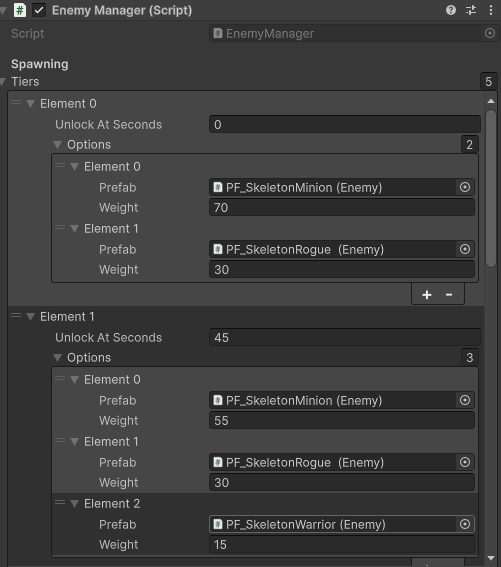
The wave progression is controlled by EnemyManager, which acts as the central wave director. It unlocks enemy tiers over time, selects enemies through weighted random logic, increases spawn pressure during the run, validates spawn positions, and triggers the timed boss encounter. BossSpawned and BossDefeated events connect the enemy system to the game flow and eclipse presentation.
Technical Breakdown
The enemy system was built around lightweight steering instead of NavMesh or behaviour trees. EnemyMover.cs gives each enemy a target, usually the player, and combines three simple movement behaviours: moving toward the player, separating from nearby enemies, and slightly orbiting around the player. This creates a more readable horde pattern where enemies surround and pressure the player without collapsing into one stacked group.
Snippet 1 - Enemy Steering (Seek + Separation + Orbit)
Vector3 toTarget = target.position - transform.position;
toTarget.y = 0f;
float dist = toTarget.magnitude;
if (dist <= stopDistance) return;

Vector3 desired = toTarget / Mathf.Max(dist, 0.0001f);

// Separation from neighbours via non-allocating overlap.
Vector3 sep = Vector3.zero;
int count = Physics.OverlapSphereNonAlloc(
    transform.position, separationRadius, _overlap,
    enemyLayer, QueryTriggerInteraction.Ignore);
for (int i = 0; i < count; i++)
{
    var c = _overlap[i];
    if (!c || c.attachedRigidbody == rb) continue;
    Vector3 delta = transform.position - c.transform.position;
    delta.y = 0f;
    float d = delta.magnitude;
    if (d > 0.0001f) sep += (delta / (d * d));
}

// Tangential orbit, weighted by how close we are to the desired ring radius.
Vector3 radial = transform.position - target.position; radial.y = 0f;
Vector3 tangential = Vector3.Cross(Vector3.up,
    radial.sqrMagnitude > 0.0001f ? radial.normalized : desired) * orbitSign;

float ring = (desiredOrbitRadius <= 0.001f) ? 0f
    : Mathf.Clamp01(Mathf.Abs(desiredOrbitRadius - radial.magnitude) / desiredOrbitRadius);
Vector3 orbit = tangential * (1f + (Random.value - 0.5f) * 2f * orbitJitter) * ring;

Vector3 steering = desired + separationWeight * sep + orbitWeight * orbit;
Vector3 dir = steering.sqrMagnitude > 0.0001f ? steering.normalized : desired;
rb.MovePosition(rb.position + (dir * moveSpeed * Time.fixedDeltaTime));
EnemyManager.cs acts as the wave director. It tracks the run time, unlocks enemy tiers, selects enemies through weighted random logic, and increases pressure by reducing the spawn interval over time. This allows the game to start with simpler enemies and gradually introduce stronger or more varied enemy types as the player survives longer.
Snippet 2 - Weighted Hybrid Tier Picker (Wave Director)
Enemy PickEnemy(float elapsed)
{
    if (tiers == null || tiers.Length == 0) return null;

    int latest = -1;
    for (int i = 0; i < tiers.Length; i++)
        if (elapsed >= tiers[i].unlockAtSeconds) latest = i;
    if (latest < 0) return null;

    var pool    = new Dictionary<Enemy, float>();
    var persist = new HashSet<Enemy>(persistentPrefabs ?? new Enemy[0]);

    for (int i = 0; i <= latest; i++)
    {
        var tier = tiers[i];
        if (tier.options == null) continue;

        int k = latest - i;
        float decayMul = useHybridMixing
            ? Mathf.Pow(Mathf.Clamp01(tierDecay), k)
            : 1f;

        foreach (var we in tier.options)
        {
            if (!we.prefab || we.weight <= 0f) continue;
            float mul = persist.Contains(we.prefab)
                ? Mathf.Max(decayMul, Mathf.Clamp01(persistentFloor))
                : decayMul;
            float w = we.weight * mul;
            if (w <= 0f) continue;
            if (pool.ContainsKey(we.prefab)) pool[we.prefab] += w;
            else pool.Add(we.prefab, w);
        }
    }

    float total = 0f; foreach (var kv in pool) total += kv.Value;
    float pick = NextFloat01(rngWhat) * total, run = 0f;
    foreach (var kv in pool) { run += kv.Value; if (pick <= run) return kv.Key; }
    return null;
}
The spawning system validates each spawn position before using it. Enemies are sampled around the player, then checked against the camera view, ground position, playable area, existing enemies, and obstacles. This helps avoid unfair or broken spawns, such as enemies appearing directly in front of the camera, inside props, outside the arena, or stacked on top of each other.
Snippet 3 - Difficulty Curve & Boss Trigger (Spawn Loop Core)
IEnumerator SpawnLoop()
{
    int spawned = 0;
    while (spawned < maxTotalSpawns)
    {
        active.RemoveAll(e => e == null);
        float elapsed = Time.time - _startTime;

        if (!_bossSpawned && bossPrefab && elapsed >= bossSpwanAtSeconds
            && spawnAroundPlayer && TryGetDynamicSpawnPosition(out var bossPos))
        {
            float yaw = NextFloat01(rngWhere) * 360f;
            var boss = SpawnFromPool(bossPrefab, bossPos, Quaternion.Euler(0f, yaw, 0f));
            _bossSpawned = true; _currentBoss = boss; _bossAlive = true;
            BossSpawned?.Invoke();

            // Death handshake: when the boss dies, raise BossDefeated so game flow + eclipse react.
            _bossDeathHandler = () => { _bossAlive = false; BossDefeated?.Invoke(); };
            _currentBoss.OnDied += _bossDeathHandler;
        }

        if (active.Count < maxSimultaneous)
        {
            var prefab = PickEnemy(elapsed);
            if (prefab != null && TryGetDynamicSpawnPosition(out var pos))
            {
                float yaw = NextFloat01(rngWhere) * 360f;
                SpawnFromPool(prefab, pos, Quaternion.Euler(0f, yaw, 0f));
                spawned++;
                if (spawned % stepsEvery == 0)
                    spawnInterval = Mathf.Max(minInterval, spawnInterval - IntervalStep);
            }
        }

        yield return new WaitForSeconds(spawnInterval);
    }
}
Enemy behaviour is data-driven through EnemyConfig.cs ScriptableObjects. Health, movement speed, turn speed, attack range, cooldown, damage, knockback, score value, XP, and loot settings can be tuned per enemy type without changing code. This made it easier to create different enemy archetypes while keeping the same shared component structure.
Combat is split into smaller focused components. EnemyAttack.cs handles range checks, cooldowns, and player damage. EnemyHealth.cs manages damage and death events. EnemyKnockback.cs adds hit reaction feedback, while EnemyAnimationBridge.cs and EnemySfx.cs connect movement, attacks, hits, and death to animation and audio feedback.
The boss encounter is integrated into the same wave director. When the survival timer reaches the configured boss time, EnemyManager spawns the boss through the same validated spawn pipeline and raises BossSpawned and BossDefeated events. These events connect the enemy system to the game flow and eclipse presentation, allowing the boss fight, win condition, and visual eclipse state to stay synchronized.
ROGUE-LITE PROGRESSION & UPGRADE SYSTEM
Problem
Eclipse Survivor needed a progression system that made each short survival run feel rewarding and different. The player had to gain power during the run, make quick upgrade choices, unlock abilities, and scale against enemy waves that became more dangerous over time.
The system also needed to stay readable and easy to balance. Upgrades had to be simple to author, level-up choices had to avoid offering impossible or useless options, and XP bursts had to be handled safely without skipping player decisions.
Solution
I built an event-driven rogue-lite progression loop. When enemies die, they generate XP through the loot system. XP is collected by the player and sent to ExperienceManager, which tracks the current level, XP threshold, and level-up events.
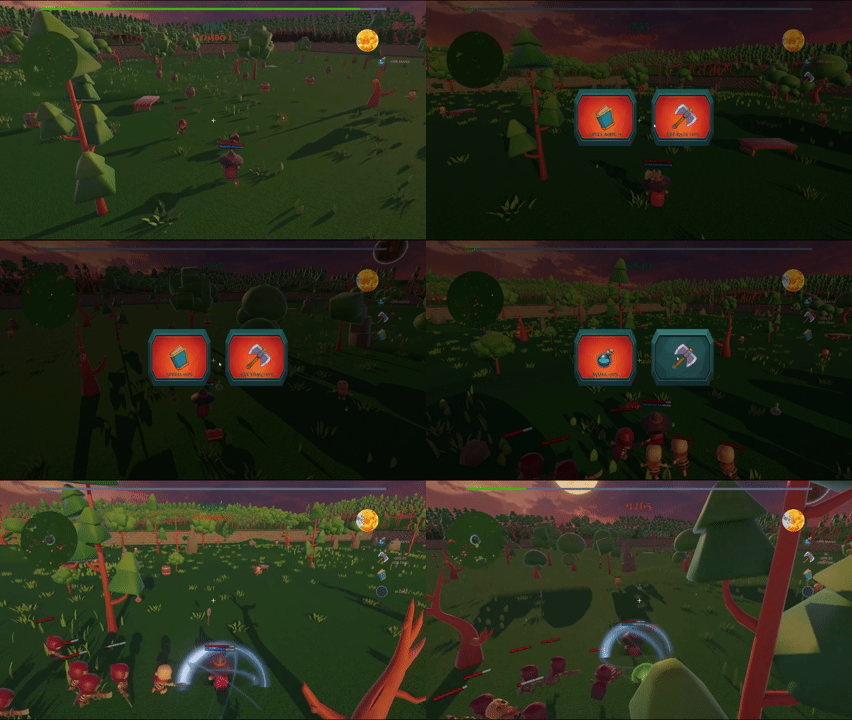
When the player levels up, the game pauses and LevelUpUI presents two weighted upgrade choices from an UpgradeLibrary. The choices are filtered so the player only receives valid options, such as avoiding ability-scaling upgrades before the base ability has been unlocked.
Selected upgrades are applied through UpgradeSystem, which dispatches each UpgradeDef ScriptableObject to the correct gameplay system. This allows upgrades to modify player stats, mana, movement speed, damage, or unlock and scale abilities such as Orbiting Books, Throwing Axe, and Damage Aura.
Technical Breakdown
Snippet 1 - XP Accumulation & Level-Up Events
public class ExperienceManager : MonoBehaviour
{
    public static ExperienceManager Instance { get; private set; }

    public int xpToLevel = 50;
    public int xpIncrementPerLevel = 25;

    public int CurrentXP    { get; private set; }
    public int CurrentLevel { get; private set; }

    public event Action<int, int> OnXPChanged;
    public event Action<int> OnLevelUp;

    public void AddXP(int amount)
    {
        if (amount <= 0) return;
        CurrentXP += amount;
        while (CurrentXP >= xpToLevel)
        {
            CurrentXP -= xpToLevel;
            CurrentLevel++;
            xpToLevel += xpIncrementPerLevel;
            OnLevelUp?.Invoke(CurrentLevel);
        }
        Raise();
    }

    void Raise() => OnXPChanged?.Invoke(CurrentXP, xpToLevel);
}
Snippet 2 - Weighted Upgrade Pick With Distinct Kinds
public (UpgradeDef, UpgradeDef) PickTwoFiltered(
    Predicate<UpgradeDef> allow, bool distinctKinds = true)
{
    var pool = new List<UpgradeDef>();
    foreach (var o in options)
        if (o && (allow == null || allow(o))) pool.Add(o);

    if (pool.Count == 0) return (null, null);
    if (pool.Count == 1) return (pool[0], pool[0]);

    var first = WeightedPick(pool);
    UpgradeDef second = null;

    if (distinctKinds)
    {
        var alt = pool.FindAll(p => p != first && p.kind != first.kind);
        if (alt.Count > 0) second = WeightedPick(alt);
    }
    if (second == null)
    {
        var alt = pool.FindAll(p => p != first);
        second = alt.Count > 0 ? WeightedPick(alt) : first;
    }
    return (first, second);
}

private static UpgradeDef WeightedPick(List<UpgradeDef> pool)
{
    float total = 0f;
    foreach (var def in pool) total += Mathf.Max(0f, def.weight);
    if (total <= 0f) return pool[UnityEngine.Random.Range(0, pool.Count)];

    float r = UnityEngine.Random.value * total, acc = 0f;
    foreach (var def in pool)
    {
        acc += Mathf.Max(0f, def.weight);
        if (r <= acc) return def;
    }
    return pool[pool.Count - 1];
}
Snippet 3 - Single Switch Dispatch That Fans Out Across Gameplay Systems
public void Apply(UpgradeDef def)
{
    if (!def) return;
    switch (def.kind)
    {
        case UpgradeKind.DamagePercent:
            playerStats?.IncreaseDamagePercent(def.amountPercent);
            break;

        case UpgradeKind.MaxHealthPercent:
            if (playerStats && playerHealth)
                playerStats.IncreaseMaxHealthPercent(playerHealth, def.amountPercent);
            break;

        case UpgradeKind.SpeedPercent:
            playerController?.IncreaseMoveSpeedPercent(def.amountPercent);
            break;

        case UpgradeKind.MaxManaPercent:
            shooter?.IncreaseMaxManaPercent(def.amountPercent, true);
            break;

        case UpgradeKind.OrbitingBook:
            if (orbitBooks)
            {
                orbitBooks.ConfigureFromDef(def);
                orbitBooks.AddBooks(def.addCountBook);
            }
            break;

        case UpgradeKind.ThrowingAxe:
            if (axe) { axe.ConfigureFromDef(def); axe.AddAxe(def.addCountAxe); }
            break;

        case UpgradeKind.DamageAura:
            if (aura) { aura.ConfigureFromDef(def); aura.Acquire(); }
            break;
    }

    OnUpgradeApplied?.Invoke(def);
}

// 14 UpgradeKind cases total — one switch fans out to every gameplay system.
The progression system is built around an event-driven rogue-lite loop. When enemies die, DropFactory creates XP rewards either as pooled XPPotion pickups or as direct XP grants. The player collects XP through an XPCollector marker, and the collected value is sent to ExperienceManager, which tracks current XP, current level, and the XP threshold for the next level.
ExperienceManager raises events when XP changes or when the player levels up. If the player gains enough XP to pass multiple thresholds at once, the system queues the level-ups instead of skipping them. This makes sure the player still receives one upgrade choice for each level gained.
The upgrade selection is handled by LevelUpUI and UpgradeLibrary. When a level-up occurs, gameplay is paused through PauseStack, and the player is shown two weighted upgrade choices. The upgrade pool is filtered so that the player only receives valid options, such as requiring a base ability before receiving upgrades for that ability.
Upgrade data is stored in UpgradeDef ScriptableObjects. These assets define the upgrade type, value, icon, weight, stack limits, ability prefab references, projectile settings, and aura settings. This makes the system data-driven, so upgrade balance can be adjusted directly in Unity without rewriting gameplay code.
The selected upgrade is applied through UpgradeSystem, which uses a central UpgradeKind switch to route the upgrade to the correct system. Stat upgrades affect systems such as PlayerStats, PlayerPhysicsController, PlayerHealth, and RayCastShooter. Ability upgrades unlock or scale systems such as Orbiting Books, Throwing Axe, and Damage Aura.
The system also includes HUD feedback. XPBarUI reacts to XP and level-up events, while UpgradeHUD listens for applied upgrades and creates compact badges that summarize the player’s current build. This gives the player clear feedback on their run progression without needing a complex inventory system.
This implementation connects XP collection, level-up choices, stat scaling, ability unlocks, ScriptableObject data, and HUD feedback into one complete run-based progression loop.
OBJECT POOLING & PROCEDURAL SPAWN OPTIMIZATION
Problem
Eclipse Survivor needed to support a horde-survivor gameplay loop where enemies, pickups, projectiles, and visual effects appear continuously during a short run. Spawning everything with Instantiate and Destroy would create unnecessary runtime overhead, while weak spawn rules could cause enemies to appear inside obstacles, on top of each other, outside the arena, or directly in front of the camera.
The system also needed to keep XP pickups under control. Without cleanup rules, large enemy waves could leave too many collectible objects in the scene, increasing clutter and risking performance issues.
Solution
I optimized the highest-volume runtime objects by pooling enemies and XP pickups. EnemyManager owns per-prefab enemy pools, while DropFactory manages pooled XP potions. Each enemy is safely reset when reused, including health, movement, attack logic, physics state, event subscriptions, target references, and health bar UI.
I also implemented a procedural spawn validation pipeline. Enemy spawn positions are sampled around the player, then checked against camera visibility, ground position, playable-area bounds, enemy overlap, and obstacle overlap before the enemy is allowed to spawn. This keeps enemy waves fair and prevents broken spawn placement.
For XP pickups, I added pooling, magnet behavior, auto-despawn, and a global cap. This allows the XP economy to remain readable and stable even when many enemies die during a wave.
Technical Breakdown
Enemy pooling is handled through EnemyManager. At runtime, the manager creates one pool per enemy prefab and reuses enemies instead of constantly creating and destroying them. When an enemy is taken from the pool, it is positioned, activated, reset, and rebound to the player target. This makes the enemy ready for a new life without carrying stale state from its previous use.
Enemy reuse is made safe through the enemy lifecycle. Enemy.ResetState clears old coroutines and events, restores health, reinitializes movement and attack components, resets physics velocity, wakes the Rigidbody, and re-enables colliders. EnemyManager then refreshes references such as the target player and the enemy health bar. When the enemy dies, it runs its death cleanup and returns to the correct pool instead of being destroyed.
The procedural spawn system samples enemy positions around the player using a ring-based approach. Before a position is accepted, it is validated through several checks: whether it is visible to the camera, whether there is valid ground below it, whether it is inside the playable area, whether it overlaps existing enemies, and whether it collides with obstacles. This prevents unfair or broken spawns while preserving the feeling that enemies are surrounding the player from off-screen.
XP pickups are handled separately by DropFactory and XPPotion. Depending on the enemy loot setup, XP can either be granted directly or spawned as a pooled pickup in the world. XP potions can magnet toward the player, despawn automatically after a set time, and are limited by a global cap so the scene does not fill with too many collectibles.
The system also uses performance-oriented techniques in repeated gameplay loops. Enemy movement and damage aura checks use non-allocating physics queries with reused collider buffers, reducing garbage collection pressure during combat. EnemyManager and DropFactory also track pool usage and runtime counts, making it easier to debug active objects and understand how the system behaves during high-pressure waves.
Not every object in the project is pooled. The main optimization focus was enemies and XP pickups because they are the highest-volume runtime objects. Some lower-frequency objects, such as thrown axe projectiles, muzzle effects, impact effects, pickup VFX, and barrels, still use Instantiate and Destroy. This was an intentional scope decision for the current version, with future optimization passes planned if profiling shows those objects becoming a bottleneck.
Snippet 1 - Per-Prefab ObjectPool With Lifecycle Callbacks
ObjectPool<Enemy> CreatePoolForPrefab(Enemy prefab)
{
    if (!prefab) return null;

    var pf  = prefab;
    var cfg = GetPoolConfig(pf);

    return new ObjectPool<Enemy>(
        // create
        () =>
        {
            var e = Instantiate(pf);
            e.gameObject.SetActive(false);
            _totalEnemiesCreated++;
            return e;
        },
        // on-get: stamp the pool key + return delegate onto the instance
        e =>
        {
            e.PoolKey      = pf;
            e.ReturnToPool = SafeRelease;
        },
        // on-release: deactivate so it stops ticking + colliding
        e => e.gameObject.SetActive(false),
        // on-destroy: when pool overflows past maxSize
        e =>
        {
            _totalEnemiesDestroyed++;
            Destroy(e.gameObject);
        },
        collectionCheck:  false,
        defaultCapacity:  cfg.defaultCapacity,
        maxSize:          cfg.maxSize
    );
}
Snippet 2 - Safe Enemy Reuse: ResetState()
public void ResetState()
{
    StopAllCoroutines();
    ClearEnemyEvents();

    if (health) health.Initialize(MaxHealth);

    var mover = GetComponent<EnemyMover>();
    if (mover)  { mover.enabled  = true; mover.Initialize(config); }

    var attack = GetComponent<EnemyAttack>();
    if (attack) { attack.enabled = true; attack.Initialize(config); }

    if (rb)
    {
        rb.linearVelocity  = Vector3.zero;
        rb.angularVelocity = Vector3.zero;
        rb.isKinematic     = false;
        rb.WakeUp();
    }

    foreach (var c in GetComponentsInChildren<Collider>(true))
        c.enabled = true;
}
Snippet 3 - Validated Dynamic Spawn Around the Player
private bool TryGetDynamicSpawnPosition(out Vector3 pos)
{
    pos = default;
    if (!player) return false;

    Vector3 center = player.position;

    for (int i = 0; i < ringSamples; i++)
    {
        // Uniform sample on a disc between minSpawnRadius and maxSpawnRadius.
        float u = NextFloat01(rngWhere);
        float r = Mathf.Sqrt(Mathf.Lerp(
            minSpawnRadius * minSpawnRadius,
            maxSpawnRadius * maxSpawnRadius, u));
        float angle = NextFloat01(rngWhere) * Mathf.PI * 2f;
        Vector3 candidate = center + new Vector3(Mathf.Cos(angle), 0f, Mathf.Sin(angle)) * r;

        if (avoidVisibleToCamera && cam)
        {
            Vector3 v = cam.WorldToViewportPoint(candidate);
            bool visible = v.z > 0f &&
                v.x > -visiblePad && v.x < 1f + visiblePad &&
                v.y > -visiblePad && v.y < 1f + visiblePad;
            if (visible) continue;
        }

        Vector3 start = candidate + Vector3.up * rayStartHeight;
        if (!Physics.Raycast(start, Vector3.down, out var hit,
                rayStartHeight + raycastDown, groundMask)) continue;

        Vector3 grounded = hit.point + Vector3.up * groundOffset;

        if (!IsInsidePlayableArea(grounded)) continue;
        if (Physics.CheckSphere(grounded, spawnClearRadius, enemyLayer)) continue;
        if (obstacleMask.value != 0 &&
            Physics.CheckSphere(grounded, spawnClearRadius, obstacleMask)) continue;

        pos = grounded;
        return true;
    }
    return false;
}
Snippet 4 - Global Live-Cap & Auto-Despawn for Pooled XP Pickups
void OnEnable()
{
    consumed = false;
    bornAt   = Time.time;
    target   = null;
    if (col) col.enabled = true;

    _liveNode = live.AddLast(this);

    // Enforce global cap by evicting the oldest potion.
    while (live.Count > globalMax)
    {
        var node = live.First;
        live.RemoveFirst();
        var oldest = node.Value;
        oldest._liveNode = null;
        if (oldest) oldest.ForceDespawn();
    }

    StopAllCoroutines();
    if (autoDespawnAfter > 0f) StartCoroutine(AutoDespawn());
}

void ForceDespawn()
{
    RemoveFromLive();
    if (_returnToPool != null) _returnToPool(this);
    else Destroy(gameObject);
}
Technical Challenge & Future Work
During development, I investigated a severe runtime memory spike that appeared when active enemy groups became visible on screen. At first, the issue looked like a possible gameplay-side memory leak, so I profiled systems connected to enemy spawning, XP pickups, enemy pooling, health bars, and combat VFX.
The investigation showed that these gameplay systems behaved within expected limits and did not explain the memory growth. Using Unity’s Memory Profiler and controlled isolation tests, I narrowed the issue down to the enemy visual runtime path. Disabling enemy renderers removed the spike, while simplified proxy enemies using the same gameplay spawn path remained stable.
The current conclusion is that the issue is most likely connected to the original skinned enemy visual setup or an asset/render-path integration problem, rather than the core object pooling or wave spawning logic. A future implementation pass will focus on rebuilding or replacing the affected enemy visual assets, testing optimized skinned meshes, and validating the result in both the Unity Editor and Development Build.